
Your fleet, ready for AI. Still yours.
Screenshots in this gallery: Voice agent, Dispatcher assistant, Chat with translation
One tap, both hands on the wheel
No typing, translating or chasing client messages mid-drive. And every action still goes through the driver.
Speak, don't type
Tap “Tap to talk” and speak in Croatian. The assistant answers in Croatian. No typing while you drive.
It books rides by voice
It asks for pickup, time and phone, works out the price and asks for confirmation before the booking exists. As recorded: a €109 Oroslavje–Zagreb ride, driver assigned.
The driver stays in charge
Actions are proposed, never executed silently. Confirm in the app. Minimise to picture-in-picture or end the call with one tap.
It answers in the customer's language
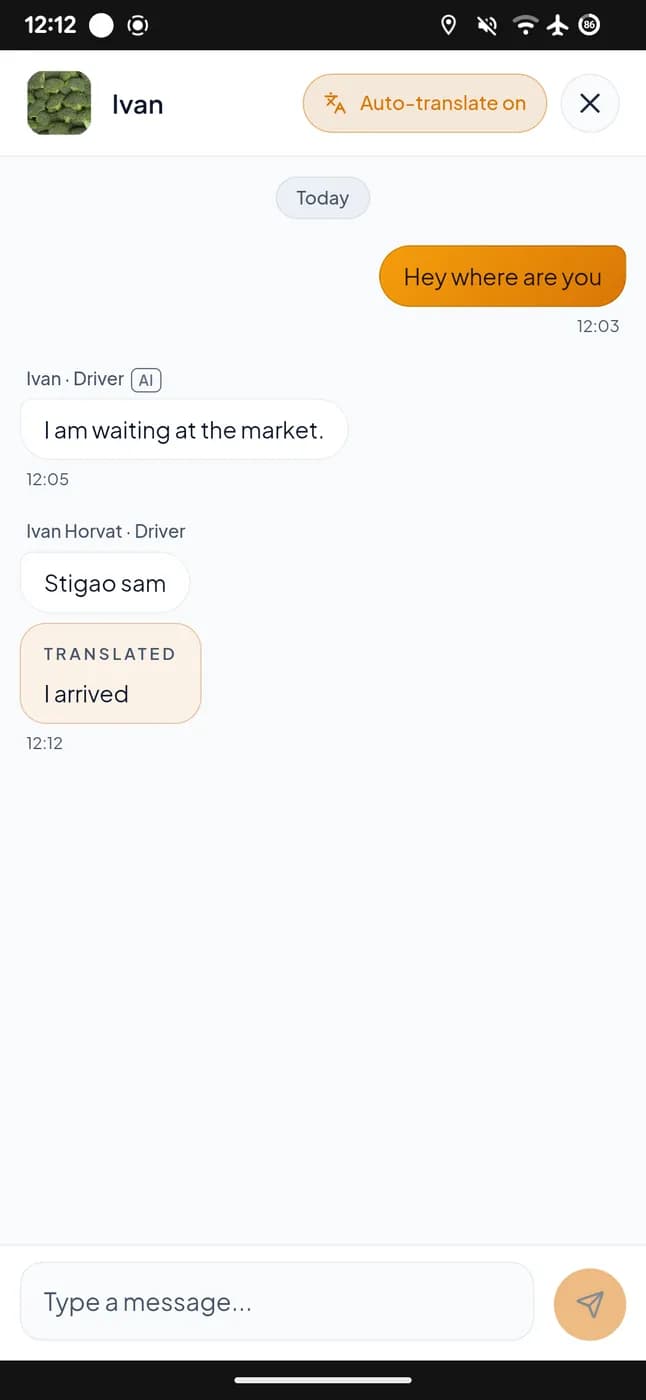
It reads the trip and the client's last message, drafts a reply in their language and sends it once the driver confirms. Even on WhatsApp/Telegram threads with no booking.
Real recording. Driver books a ride by voice (2× speed)
The whole office, in one admin panel
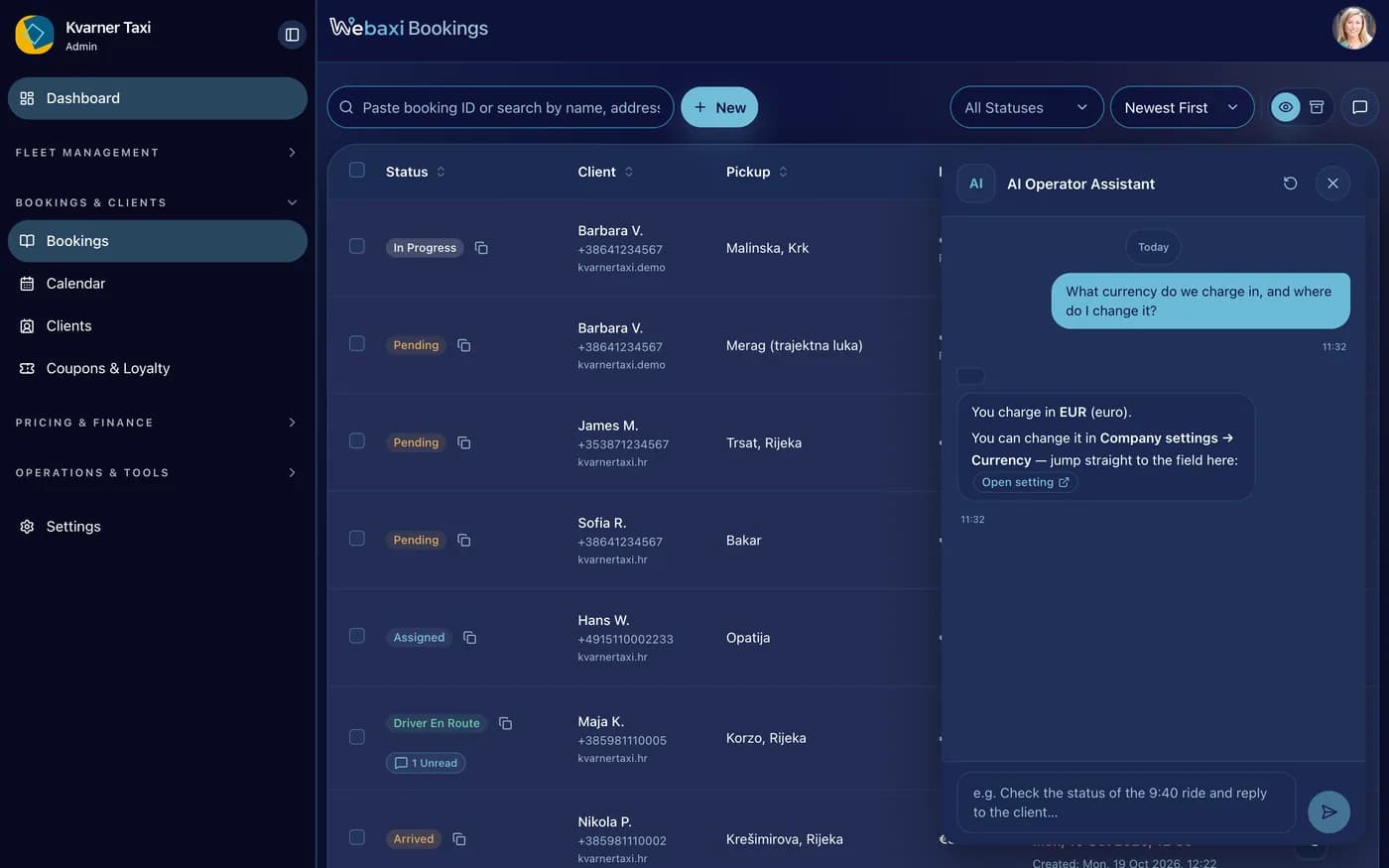
Inside the panel: the booking list, the assistant answering in the same screen, and the currency setting it opens straight from its own answer.
Real desktop recording, the Webaxi web app
One place to run it
Bookings, dispatch, pricing and settings live together. And agents work on those same records.
The assistant uses the same screens
The agent API and MCP reach everything the console can do.
Same permissions, always
Every action is limited to the features that business has switched on.
One assistant for the whole company
The same engine sits behind the console screen and every agent step.
1 · An assistant that works, not a chatbot
The conversation, the work it does and the confirmation step are built in. It reads your live business data, not a copy of it.
API for AI agents
Start a conversation, watch the answer arrive as it is written, and confirm a change. All of it through one API.
MCP: connect your own AI tools
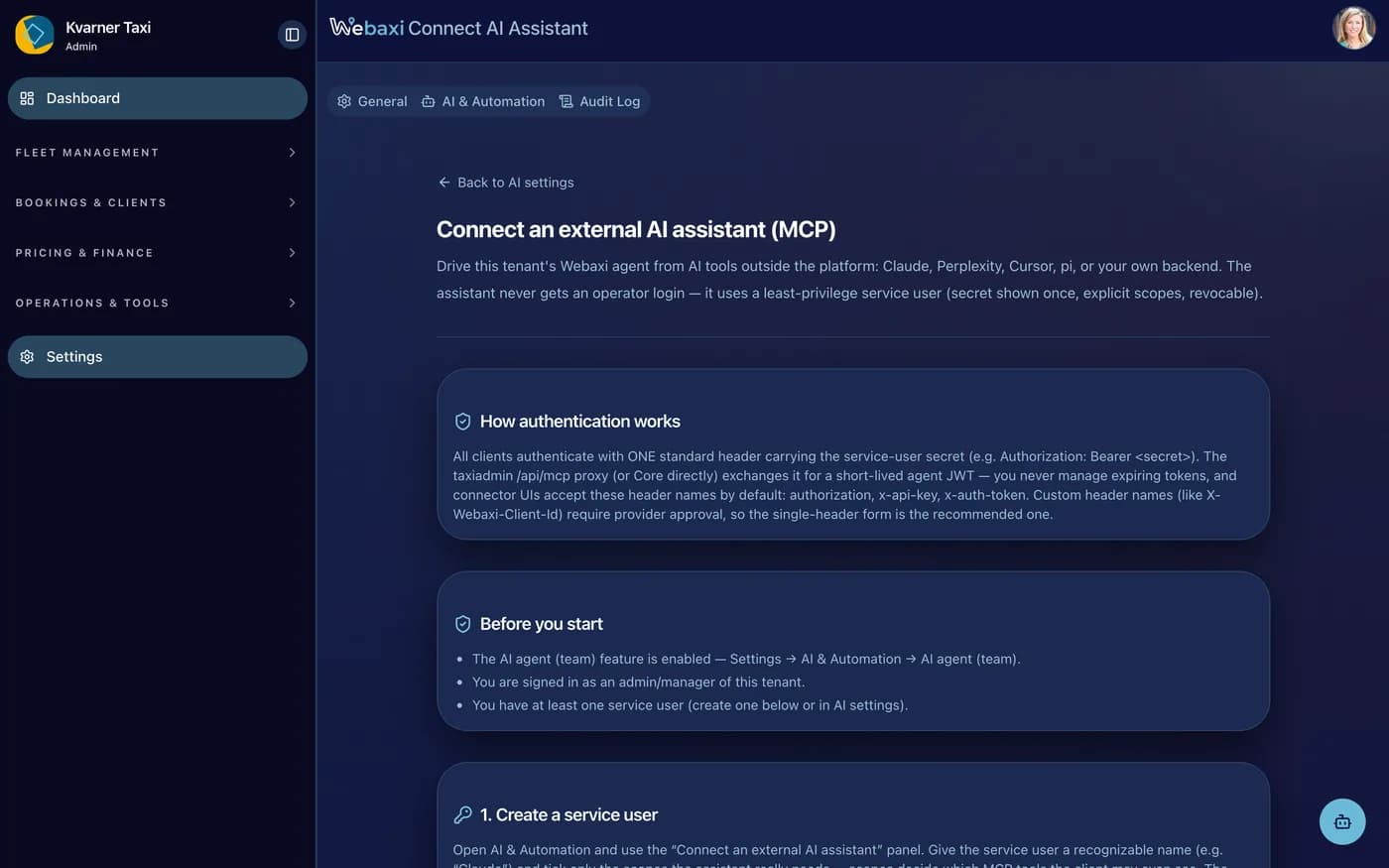
Any AI tool that speaks MCP can reach your fleet, and each one sees only the work you allowed for it.
Keys for each AI agent
Separate logins for AI connections, so an outside tool signs in with its own key instead of yours.
2 · Fifty-plus things it can do, each with its own permissions
What the console can do, the assistant can do: bookings, quotes, dispatch, zones, coupons, loyalty, templates, domains and settings.
Bookings & quotes
The full ride lifecycle: quote, create, rebook, assign and cancel, with bookings visible end to end.
Clients, drivers & team
Look up customers, drivers, vehicles and team members, with live driver positions for dispatch.
Settings
Read and change price rules, features and ready-made presets. The same controls the operator has in the console.
Chat, channels & notify
Read and answer booking chats and outside channels, manage notification templates, and see reports and the record of what was done.
Pricing, zones & coupons
Price rules, zones, coupons and loyalty programmes can be read by the assistant. Some can be changed too, after you confirm.
Templates & presets
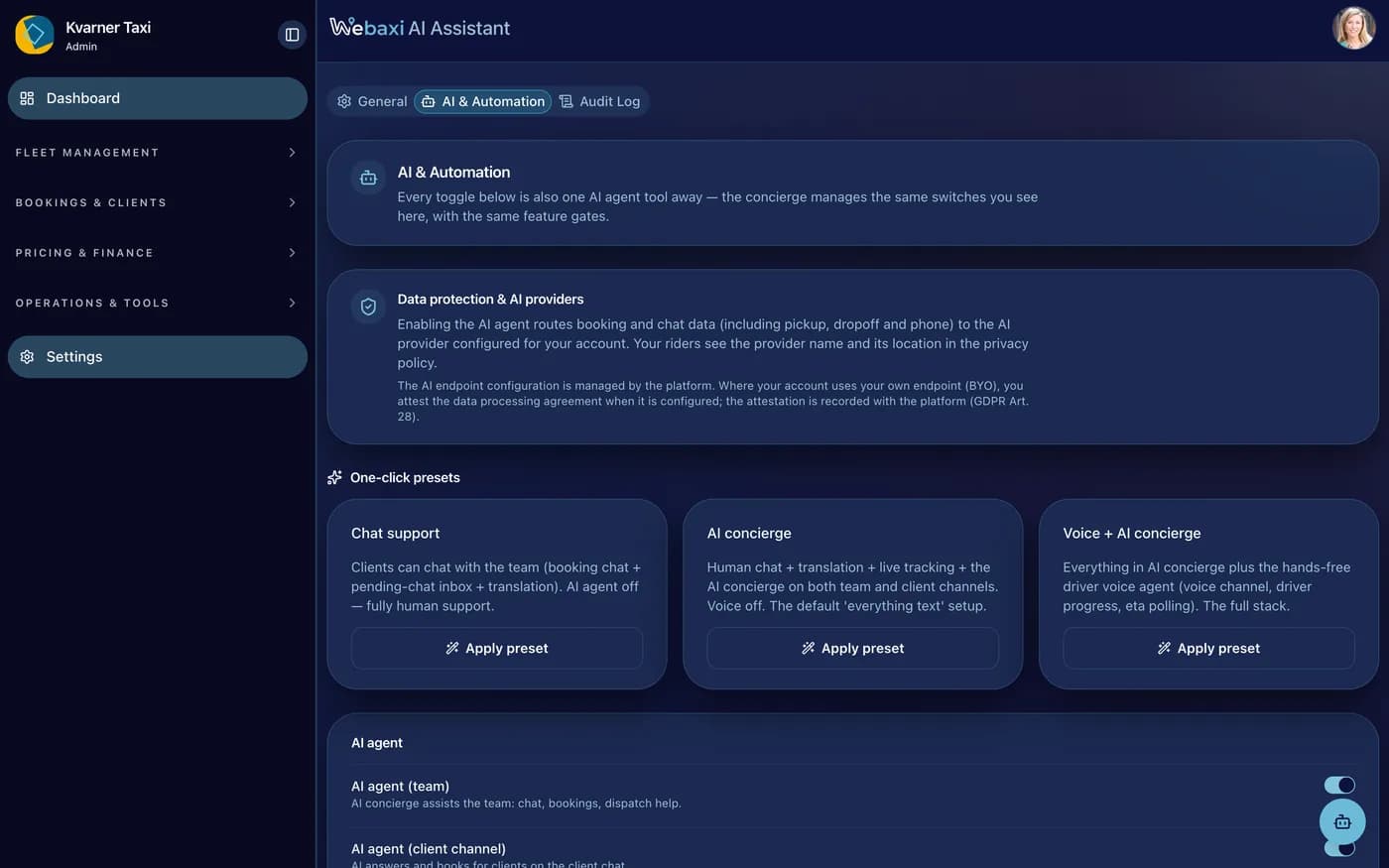
Notification templates, channel connections and the one-click presets (Chat support, AI concierge, Voice + AI concierge) are managed through the same tools.
3 · Roles, limits and a human sign-off
The assistant is not all-powerful. The driver version sees only its own rides, the operator version acts for the whole business, and any change that matters waits for a person to confirm it.
Tools that know who is asking
driver / operator / team / customer. The same tool behaves differently per person, checked on every request.
Permissions from your settings
A function you switched off is never offered at all, and the platform checks each request itself instead of trusting whoever sends it.
Nothing changes without a yes
A proposed change waits for a person to confirm it before it touches a booking, a price or a setting.
4 · Voice, translation and messaging
The same assistant runs the driver's voice agent (the “AI call” button), the in-ride customer chat with automatic translation, and WhatsApp/Telegram conversations for messages that are not bookings.
How a voice call runs
Someone speaks Croatian, a Croatian voice answers, and then it is sent. You choose which voice each business uses.
It answers in their language
Chat between client, driver and operator is translated both ways. The customer reads their language, the driver sends theirs.
WhatsApp & Telegram
Messages coming in appear in the booking chat, and replies leave on the same channel. The conversation works even without a booking.
5 · Choose your AI provider, see every step
OpenAI, Anthropic, voice models. Or bring your own. You pick the provider in settings, per business. Every action of the assistant is recorded and counted.
Bring your own AI provider
Switch providers without taking anything down. Gemini, Mistral, Kimi and the rest are handled by their own rules.
Every action logged and billed
Every agent action is stored and counted against your business. Usage is billable, like rides.
Ready-made setups
“Chat support”, “AI concierge”, “Voice + AI concierge”. One-click bundles of settings, checked before they are offered.
From one desk to a whole platform
The assistant is the same for every business. What changes is who is allowed to do what.
Night cover without a night shift
Ask for a quote, a booking or a message in your language. One assistant answers, confirms with you and hands the ride to the driver.
Each role sees only its own jobs
Each role has its own rights: a driver touches only their own rides, a manager only dispatch. Changes wait for a person.
One assistant per business, billed per use
Tools, rights and billing set per business. Assistant use is charged and recorded, and never crosses into another business.
One assistant, three jobs: customer, driver, operator
One engine, one world per role: clients get answers and bookings, drivers hands-free help, operators a dispatch assistant. Permissions and confirmation stay per role.
Answers questions and gives a price
Ask about a route: real distance, duration and price, ferry legs and zones included.
Books, changes and cancels, after you confirm
It proposes the booking and waits for confirmation before it exists.
Chats in your language
Chat is translated both ways, so driver and customer always understand each other.
Reachable on WhatsApp & Telegram
The assistant replies on WhatsApp or Telegram, even to a contact with no booking yet.
Voice agent, hands free
Tap once; it listens in Croatian and answers out loud.
Takes a booking by voice
Pickup, time, phone and price collected in one call, then the ride assigned on confirm.
Writes replies to the customer
It drafts the reply in the client's language; the driver sends it.
Sees only own rides
In the driver role it sees and touches only its own rides.
Ask anything about the fleet
“What's the next upcoming ride?” The assistant answers with live bookings, customers, drivers, vehicles and statuses.
Change things, after you confirm
Assign, cancel, update prices, zones or features. Each one proposed first, and written down afterwards.
Change settings in one sentence
One-click presets (Chat support, AI concierge, Voice + AI concierge) and a direct link to the exact setting, for example the one that makes client check-in required.
Every action is logged and billed
Every agent action is stored per business and usage is billed. The AI is a chargeable service, just like the rides.
Screenshots in this gallery: AI assistant, answers with links to settings, AI and Automation, one-click presets and settings, Connect your own AI: address, rights and separate logins
How an AI agent books a ride. Webaxi's own or any other
Discover
An agent can be Webaxi's own or any external AI that reaches your branded site and its registered MCP tools. It sees only what the business enabled.
Quote & decide
Real price quotes, distance, duration and ferry legs included.
Act with confirmation
The assistant suggests the action, a person confirms it, unless you allowed that job to go ahead on its own.
Notify & follow
Drivers get the booking pushed to them, the customer is told on their channel, and the assistant can read the result back.
Your fleet, ready for the AI tools customers use
Connect Claude Desktop, Perplexity or any other AI tool through MCP: it can look up your fleet, price a ride and book it without opening the console. It sees only what you switched on, and every call is recorded and billed.